
smart-todo-app-local
Modern, full-featured web-based task management application
Built with pure Python and JavaScript. Intuitive interface with dark theme, drag & drop, smart filtering, and local SQLite database.
Smart ToDo App is a modern, full-featured web-based task management application built with pure Python and JavaScript. The application offers an intuitive interface with dark theme and a complete set of features for productive task management.
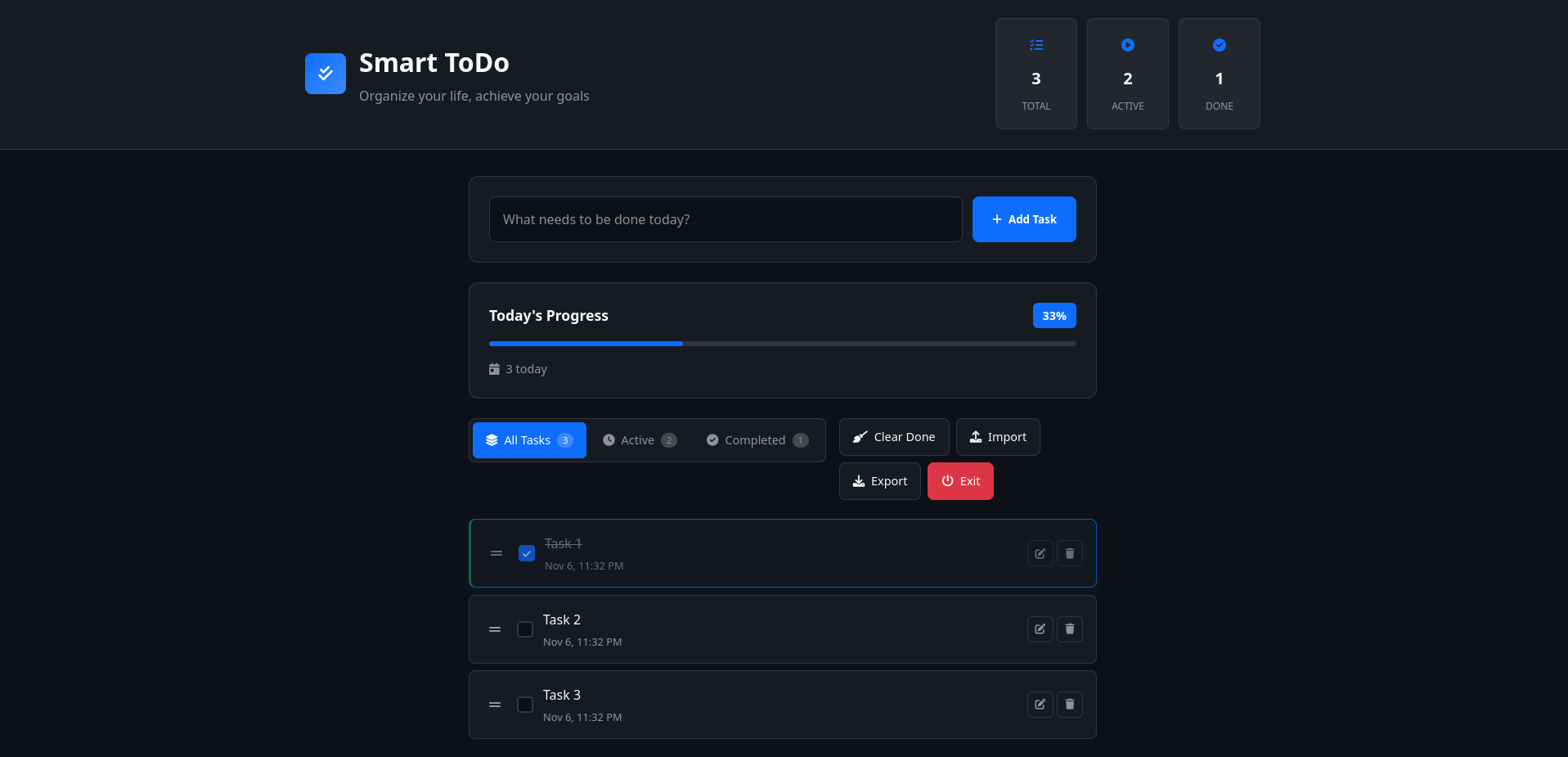
- Complete Task Management — create, edit, delete, mark as completed
- Drag & Drop Reordering — intuitively rearrange tasks with mouse
- Manual Reordering — move tasks up/down with buttons
- Smart Filtering — view active, completed, or all tasks
- Local Database — SQLite for reliable data storage
- Responsive Design — works perfectly on all devices
- Dark Theme — modern eye-friendly interface
- Real-time Statistics — track progress with live counters
- Import/Export — backup and restore your tasks in JSON format
- Auto Backup — automatic database backups with retention
- Fast & Lightweight — no external dependencies required
- Persistent Order — task order saved between sessions
- Backend: Pure Python 3, HTTP server, SQLite
- Frontend: Vanilla JavaScript, CSS3, HTML5
- Icons: Font Awesome 6
- Database: SQLite with automatic schema management
# Run the application
python main.py
The application will:
- Start the local server on available port (8000, 8001, etc.)
- Automatically open your default browser
- Create the SQLite database automatically
- Create backup directory for database backups
- Be ready to use immediately
Manual Access:
If the browser doesn't open automatically, visit: http://localhost:8000
Adding Tasks:
- Type your task in the input field
- Press Enter or click "Add Task"
- Tasks are saved instantly to the database
Managing Tasks:
- Checkbox: Mark tasks as completed/incomplete
- Edit: Modify task text with inline editing
- Delete: Remove tasks with confirmation
- Drag & Drop: Reorder tasks by dragging them
- Arrows: Reorder tasks by moving them up/down
Filtering:
- Active: Show only pending tasks
- All: Display all tasks
- Completed: View finished tasks only
Data Management:
- Export: Download all tasks as JSON file
- Import: Replace current tasks with JSON backup
- Clear Completed: Remove all finished tasks at once
- Exit: Shut down the server and close the app
| Endpoint | Method | Description |
|---|---|---|
/api/tasks | GET | Retrieve all tasks |
/api/tasks | POST | Create new task |
/api/tasks/{uuid} | PUT | Update task |
/api/tasks/{uuid} | DELETE | Delete task |
/api/reorder | POST | Update task order |
/api/shutdown | POST | Shutdown server |
The application uses CSS variables for easy theming:
:root {
    --primary: #0d1117;
    --secondary: #161b22;
    --accent: #0d6efd;
    --success: #198754;
    /* ... more variables */
}
Fully responsive design with optimized layouts for:
- Mobile phones (320px+)
- Tablets (768px+)
- Desktop (1024px+)
- Automatic Backups — Database backed up on every startup
- Backup Retention — Keeps last 3 backups, removes older ones
- Data Persistence — Task order and status preserved between sessions
Port already in use:
# Server automatically finds next available port (8000, 8001, 8002...)
# Or kill process using port (Unix/Linux/Mac)
lsof -ti:8000 | xargs kill -9
Browser doesn't open automatically:
- Manually navigate to
http://localhost:8000(or next available port) - Check if your firewall allows Python applications
Tasks not saving:
- Ensure write permissions in the application directory
- Check browser console for JavaScript errors
pkg update
pkg upgrade
pkg install python
pkg install git

git clone https://github.com/smartlegionlab/smart-todo-app-local.git
cd smart-todo-app-local

python main.py
> Your ToDo app now runs directly on your Android phone! No server required.
By using this software, you agree to the full disclaimer terms.
Software provided "AS IS" without warranty. You assume all risks.
Full legal disclaimer: See DISCLAIMER.md
License: BSD 3-Clause License