
Smart Task Manager
Modern desktop task management application
Built with Python and PyQt5, featuring an intuitive dark theme interface, priority-based organization, and automatic data persistence.
Smart Task Manager is a feature-rich desktop application designed to help you efficiently organize and track your tasks. With a clean dark-themed interface, priority management, due date tracking, and automatic saving, it's the perfect tool for personal productivity.
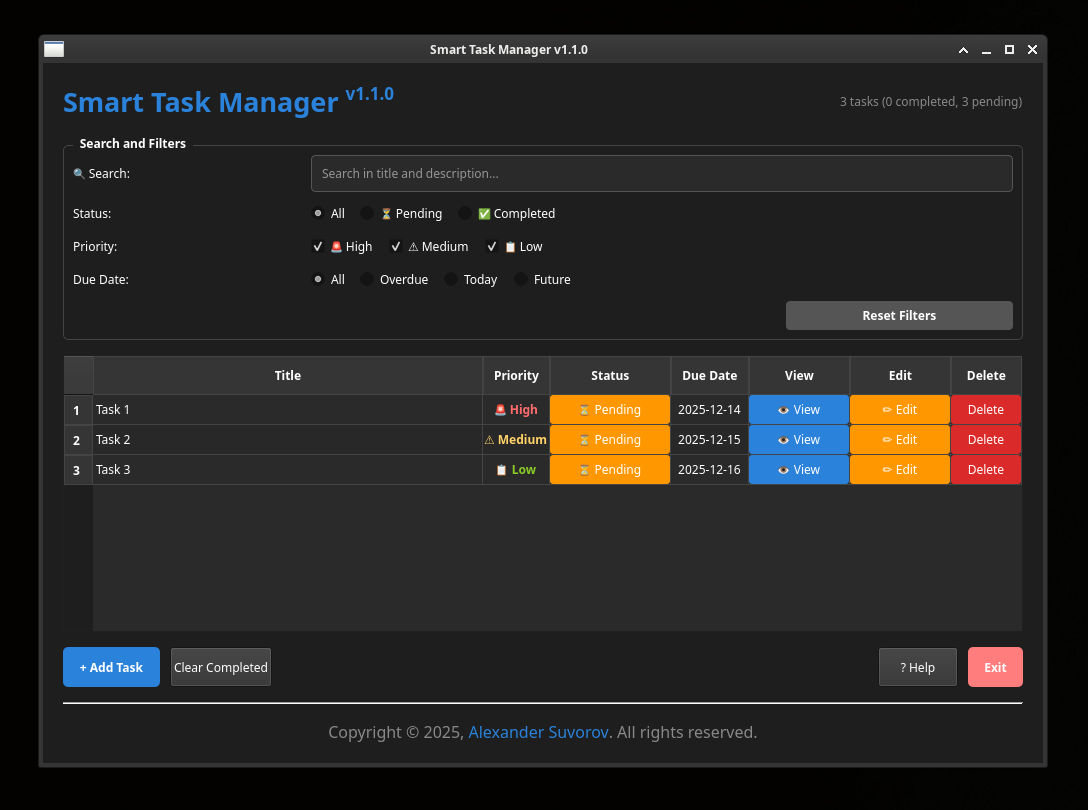
Task Management:
- Create tasks with title, description, priority, and due date
- Edit tasks anytime with full detail modification
- View task details in a dedicated dialog
- Delete tasks individually or clear completed tasks in bulk
Priority System:
- Three priority levels: High, Medium, Low
- Color-coded visual indicators for quick identification
Task Status:
- Toggle completion status with one click
- Visual strikethrough for completed tasks
- Overdue task highlighting (red text for overdue items)
Data Management:
- Automatic saving to
~/.todos.json - Persistent storage between sessions
- JSON-based data format for easy backup and migration
- Statistics tracking (total, completed, pending tasks)
User Interface:
- Dark theme with modern styling
- Responsive table layout with resizable columns
- Context menu for quick actions (right-click on tasks)
- Task statistics displayed in real-time
Additional Features:
- Due date calendar picker with visual date selection
- Task descriptions with word wrap
- Overdue task notifications (visual indicators)
- Help documentation built into the application
- Confirmation dialogs for destructive actions
Prerequisites: Python 3.7+, PyQt5
# Clone the repository
git clone https://github.com/smartlegionlab/smart-task-manager.git
cd smart-task-manager

# Install required dependencies
pip install -r requirements.txt

# Run the application
python task_manager.py
One-line Installation:
git clone https://github.com/smartlegionlab/smart-task-manager.git && cd smart-task-manager && pip install PyQt5 && python task_manager.py
Creating a New Task:
- Click the "➕ Add Task" button
- Fill in the task details:
- Title (required): Brief description of the task
- Description (optional): Detailed notes
- Priority: Select from High, Medium, or Low
- Due Date: Choose from the calendar picker
- Click "Create Task"
Managing Tasks:
- Toggle Completion: Click the status button (⏳/✅)
- View Details: Click the "👁 View" button
- Edit Task: Click the "✏️ Edit" button
- Delete Task: Click the "🗑️" button
Quick Actions (Context Menu):
Right-click on any task in the table to access:
- Mark as Complete/Pending
- Edit Task
- View Details
- Delete Task
Bulk Operations:
- Clear Completed Tasks: Click "🗑️ Clear Completed" to remove all completed tasks
- Exit Confirmation: Application warns if unsaved tasks exist on exit
File Location:
Tasks are automatically saved to: ~/.todos.json
Data Format:
{
  "task-uuid-here": {
    "id": "uuid-string",
    "title": "Task Title",
    "description": "Task Description",
    "priority": 1,
    "completed": false,
    "created_at": "2025-12-05T10:30:00.000000",
    "due_date": "2025-12-10"
  }
}
Backup & Migration:
- Simply copy the
~/.todos.jsonfile to back up your tasks - The JSON format is human-readable and editable
Build a standalone smart_task_manager.exe that runs without Python installation:
Step 1: Get the Project Files
- Download project ZIP from GitHub
- Extract to:
C:\smart-task-manager-master\
Step 2: Install Python
- Download from: python.org
- IMPORTANT: Check "Add Python to PATH"
Step 3: Open Command Prompt
cd C:\smart-task-manager-master
Step 4: Create Virtual Environment
python -m venv venv
.\venv\Scripts\activate
Step 5: Install Dependencies
pip install pyinstaller
pip install PyQt5==5.15.9
Step 6: Build Executable
pyinstaller --onefile --windowed --name "smart_task_manager.exe" --additional-hooks-dir=. app.py
Step 7: Find and Use
- Location:
C:\smart-task-manager-master\dist\smart_task_manager.exe - Create desktop shortcut and rename to "Smart Task Manager"
What you get:
- Single file:
smart_task_manager.exe(~50MB) - No Python required to run
- Works on any Windows 10/11 PC
- Can be copied to USB drive
Architecture:
- Model:
Taskclass representing individual tasks - Controller:
TaskManagerhandling data persistence and operations - View: PyQt5-based GUI with dialog windows and table view
Key Components:
- MainWindow: Primary application interface with task table
- TaskInputDialog: Modal dialog for creating/editing tasks
- TaskDisplayDialog: Modal dialog for viewing task details
- Context Menu: Right-click menu for quick task operations
Dependencies:
- PyQt5: GUI framework
- Python Standard Library: json, os, uuid, datetime, typing
- "ModuleNotFoundError: No module named 'PyQt5'"
pip install -r requirements.txt
- Application won't start
- Ensure Python 3.7+ is installed
- Check file permissions on
~/.todos.json
- Tasks not saving
- Verify write permissions in home directory
- Check disk space availability
- UI elements look wrong
- Ensure all dependencies are installed
- Try restarting the application
By using this software, you agree to the full disclaimer terms.
Software provided "AS IS" without warranty. You assume all risks.
Full legal disclaimer: See DISCLAIMER.md
License: BSD 3-Clause License