
Smart Password Manager CLI (C#)
Terminal-based smart password manager with deterministic password generation
Generate, manage, and retrieve passwords without storing them — all from your command line.
Smart Password Manager CLI (C#) — terminal-based smart password manager with deterministic password generation. Generate, manage, and retrieve passwords without storing them — all from your command line. Your secret phrase never leaves your device.
Decentralized by Design: Unlike traditional password managers that store encrypted vaults on central servers, Smart Password Manager stores nothing. Your secrets never leave your device. Passwords are regenerated on-demand — no cloud, no database, no trust required.
Cross-Platform: Windows, Linux support.
⚠️ Breaking Change (v4.0.0)
This version uses smartpasslib-csharp v4.0.0, which is NOT backward compatible with v1.x.x. Smart passwords created with older versions cannot be regenerated with v4.0.0.
What changed: Dynamic iterations (15-30/45-60), expanded character set, min 12 chars secret, password length limited to 100.
📖 Full migration instructions → see MIGRATION.md
- Zero-Storage Security — no passwords or secret phrases are ever stored or transmitted
- Decentralized Architecture — no central servers, no cloud dependency
- Deterministic Regeneration — passwords are recreated identically from your secret phrase
- Metadata Only — store only descriptions and verification keys
- Client-Side Generation — all cryptographic operations happen on your device
- On-Demand Discovery — passwords exist only when you generate them
- Decentralized & Serverless — no central database, no cloud lock-in
- Smart Password Generation — deterministic from secret phrase
- Public/Private Key System — 15-30 iterations for private key, 45-60 for public key
- Secret Verification — verify secret without exposing it
- Interactive Mode — menu-driven interface for easy use
- Command-Line Mode — scriptable operations for automation
- Export/Import — backup and restore your password metadata
- Cross-Platform — Windows, Linux support
- Hidden Input — secret phrase entry with asterisks masking
Powered by smartpasslib-csharp — C# implementation of deterministic password generation.
Key derivation (same as Python/JS/Kotlin/Go versions v4.0.0):
| Key Type | Iterations | Purpose |
|---|---|---|
| Private Key | 15-30 (dynamic) | Password generation (never stored, never transmitted) |
| Public Key | 45-60 (dynamic) | Verification (stored locally) |
Character Set:
!@#$%^&*()_+-=[]{};:,.<>?/ABCDEFGHIJKLMNOPQRSTUVWXYZ0123456789abcdefghijklmnopqrstuvwxyz
Validation Rules: Secret phrase: min 12 chars · Password length: 12-100 chars
Pre-built Binaries (no .NET required):
| Platform | Download |
|---|---|
| Windows x64 | SmartPasswordManagerCsharpCli-win-x64.exe |
| Linux x64 | SmartPasswordManagerCsharpCli-linux-x64 |
Just download, run in terminal, and start using.
# Windows
SmartPasswordManagerCsharpCli-win-x64.exe

# Linux
./SmartPasswordManagerCsharpCli-linux-x64
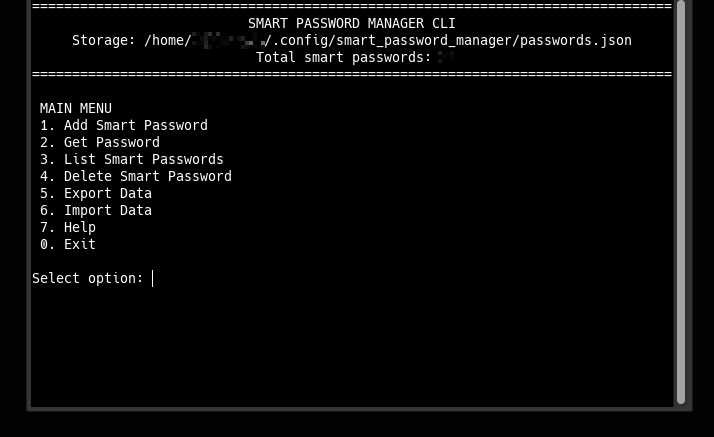
================================================================================
                           SMART PASSWORD MANAGER CLI
     Storage: /home/user/.config/smart_password_manager/passwords.json
                            Total smart passwords: 0
================================================================================

 MAIN MENU
 1. Add Smart Password
 2. Get Password
 3. List Smart Passwords
 4. Delete Smart Password
 5. Export Data
 6. Import Data
 7. Help
 0. Exit

Select option:
# Add new password (length 12-100)
SmartPasswordManagerCsharpCli-linux-x64 add "GitHub Account" 16 "MyStrongSecretPhrase2026!"

# List all passwords
SmartPasswordManagerCsharpCli-linux-x64 list

# Get password by index
SmartPasswordManagerCsharpCli-linux-x64 get 1

# Delete password by index
SmartPasswordManagerCsharpCli-linux-x64 delete 1

# Export all passwords to JSON
SmartPasswordManagerCsharpCli-linux-x64 export

# Import passwords from JSON file
SmartPasswordManagerCsharpCli-linux-x64 import ./passwords_export.json

# Show help
SmartPasswordManagerCsharpCli-linux-x64 help
Security Model:
- Proof of Knowledge — public keys verify secrets without exposing them
- Decentralized Trust — no third party needed
- Deterministic Security — same secret + length = same password, always
- Metadata Separation — non-sensitive data stored in JSON file
- Local Processing — secret and password never leave your device
- No Recovery Backdoors — lost secret = permanently lost access
Secret Phrase Requirements:
- Minimum 12 characters (enforced)
- Case-sensitive
- Use mix of: uppercase, lowercase, numbers, symbols, emoji, or Cyrillic
- Never store digitally
- NEVER use your password description as secret phrase
Strong Secret Examples:
✅ "MyStrongSecretPhrase2026!"   — mixed case + numbers + symbols
✅ "P@ssw0rd!LongSecret"         — special chars + numbers + length
✅ "КотБегемот2026НаДиете"       — Cyrillic + numbers
Weak Secret Examples (avoid):
❌ "short"                       — too short, rejected
❌ "GitHub Account"              — using description as secret (weak!)
❌ "password"                    — dictionary word, too short
❌ "1234567890"                  — only digits, too short
❌ "qwerty123"                   — keyboard pattern
-
Pointer-Based Security Paradigm
— 10.5281/zenodo.17204738
Architectural Shift from Data Protection to Data Non-Existence -
Local Data Regeneration Paradigm
— 10.5281/zenodo.17264327
Ontological Shift from Data Transmission to Synchronous State Discovery
Smart Password Manager CLI (C#) produces identical passwords to:
Data transfer: Use Export/Import to sync metadata across all platforms.
By using this software, you agree to the full disclaimer terms.
Software provided "AS IS" without warranty. You assume all risks.
Full legal disclaimer: See DISCLAIMER.md
License: BSD 3-Clause License
Storage Locations
- Linux:
~/.config/smart_password_manager/passwords.json - Windows:
%USERPROFILE%\.config\smart_password_manager\passwords.json - Export files:
~/SmartPasswordManager/passwords_export_*.json