
github-ssh-key
GitHub SSH key manager
Console utility for creating, getting, testing, and using public SSH keys for GitHub.
github-ssh-key — GitHub SSH key manager. Console utility for creating, getting, testing, and using public SSH keys for GitHub.
Supported platforms: Linux (all distributions), Termux (Android).
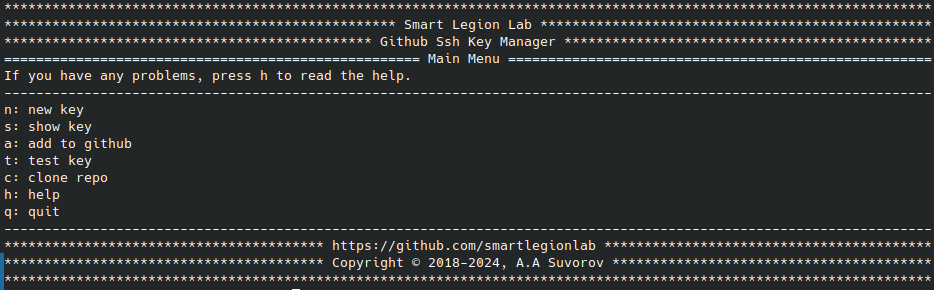
Provides a convenient interactive menu for generating SSH keys, adding them to GitHub, testing connections, and cloning private repositories via SSH.
- Convenient interactive menu — easy-to-use CLI interface
- Generating SSH keys — for GitHub with email support
- Output SSH key to console — display public key for copying
- Adding SSH key to GitHub — automate key addition
- Testing SSH key — check connection to GitHub
- Interactive menu for help — built-in command assistance
- Launch browser — open GitHub SSH key settings page
- Clone private repositories — via SSH directly from menu
- Individual commands — run specific operations
Via PyPI:
pip install github-ssh-key
github-ssh-key
From source:
python setup.py install
github-ssh-key
With requirements:
pip install -r requirements.txt
python github-ssh-key.py
| Command | Description |
|---|---|
run | Launch interactive menu |
new -e [email] | Generate new SSH key with email |
show | Display public SSH key in console |
add | Add SSH key to GitHub account |
test | Test SSH connection to GitHub |
clone -l [login] -n [repo] | Clone private repository via SSH |
help | Display help information |
Help for individual commands:
github-ssh-key [command] -h

github-ssh-key new -h
github-ssh-key show -h
github-ssh-key add -h
github-ssh-key test -h
github-ssh-key clone -h
github-ssh-key help -h
To access GitHub over SSH, follow these steps:
- Install openssh — ensure
sshcommand is available - Generate new SSH keys — use
github-ssh-key new -e your@email.com - Copy the public key — use
github-ssh-key showto display it - Add your public key to GitHub — use
github-ssh-key add - Check the connection — use
github-ssh-key test - Clone private repository — use
github-ssh-key clone -l [login] -n [repo]
⚠️ During generation, enter your GitHub email. Do not change the default file name. Skip passphrase if you don't want to enter it every time.
# Install Termux
apt update
pkg install python

# Install github-ssh-key
pip install github-ssh-key
github-ssh-key
By using this software, you agree to the full disclaimer terms.
Software provided "AS IS" without warranty. You assume all risks.
Full legal disclaimer: See DISCLAIMER.md
License: BSD 3-Clause License