
Forgejo Sync Manager GUI
Desktop GUI application for batch synchronization of Forgejo repositories
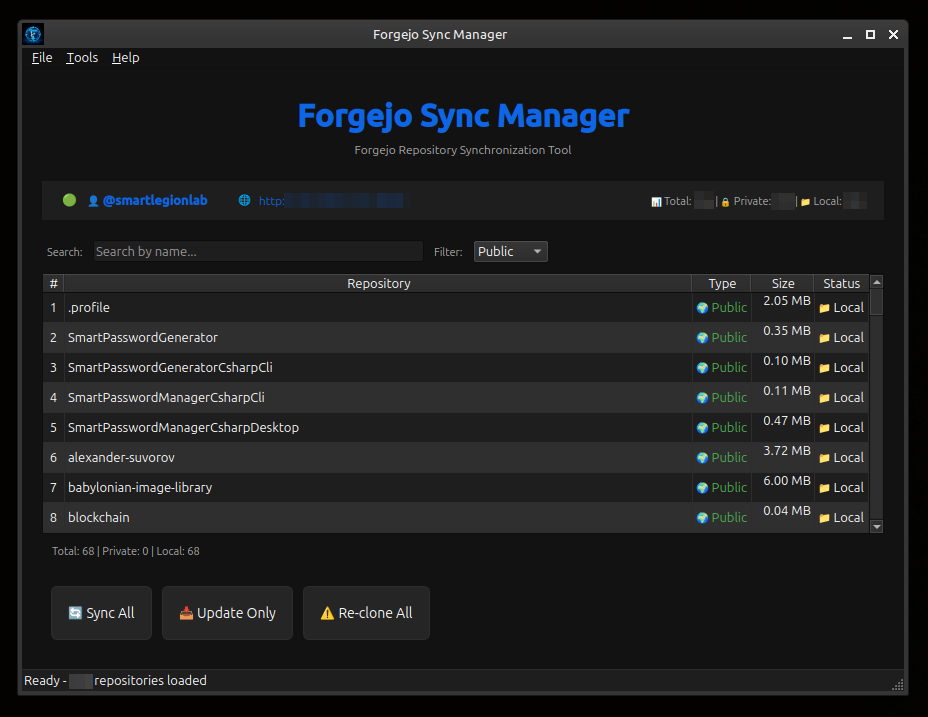
Modern dark theme interface with real-time progress tracking.
forgejo-sync-manager-gui — desktop GUI application for batch synchronization of Forgejo repositories to local machine.
Modern dark theme interface with automatic authentication via personal access token, batch repository cloning and updating, and real-time progress tracking.
- Modern Dark Theme — sleek GUI interface
- Automatic Authentication — via personal access token
- Batch Repository Cloning — with real-time progress tracking
- Visual Repository List — with search and filter capabilities
- Re-cloning Option — full repository recloning
- Local Deletion — delete local repositories
- Batch Delete All — delete all local copies with progress tracking
- One-click Open — open in browser or local folder
- Persistent Configuration — connection settings stored locally
- Multi-selection — batch operations on multiple repositories
- Python 3.8+
- Git
- Forgejo server with API access
- PyQt5
There are two independent ways to use this application:
- Run from source — clone the repo, create a virtual environment, launch manually. Nothing is installed system-wide.
- Install system-wide — one command creates a menu entry. Desktop shortcut is opt-in.
Option 1 — Run from Source (no system install)
# 1. Clone the repository
git clone https://github.com/smartlegionlab/forgejo-sync-manager-gui.git
cd forgejo-sync-manager-gui

# 2. Create a virtual environment
python3 -m venv venv

# 3. Activate it
source venv/bin/activate

# 4. Install dependencies
pip install -r requirements.txt

# 5. Launch the app
python app.py
Option 2 — Install System-Wide (recommended)
Requirements: Python 3.8+, git, curl, Linux desktop with .desktop support.
curl -fsSL https://raw.githubusercontent.com/smartlegionlab/forgejo-sync-manager-gui/master/install.sh | bash
What the installer does:
- Downloads the source code from GitHub.
- Installs the application to
~/.local/share/forgejo-sync-manager-gui/. No root, no sudo. - Creates a dedicated Python virtual environment at
~/.local/share/forgejo-sync-manager-gui/venv/and installs dependencies into it. - Registers the app in your desktop environment by creating
~/.local/share/applications/forgejo-sync-manager-gui.desktop. - Refreshes the desktop database so the menu entry appears without a full re-login on most systems.
Desktop shortcut (opt-in):
By default, no Desktop shortcut is created. This is intentional — on GNOME (default on Ubuntu), desktop icons are hidden by default. To also create a Desktop shortcut during install, pass the SPM_CREATE_DESKTOP_SHORTCUT=1 environment variable to bash — the second command in the pipeline:
curl -fsSL https://raw.githubusercontent.com/smartlegionlab/forgejo-sync-manager-gui/master/install.sh | SPM_CREATE_DESKTOP_SHORTCUT=1 bash
Or export it first, then run the normal installer:
export SPM_CREATE_DESKTOP_SHORTCUT=1
curl -fsSL https://raw.githubusercontent.com/smartlegionlab/forgejo-sync-manager-gui/master/install.sh | bash
Note: Writing SPM_CREATE_DESKTOP_SHORTCUT=1 curl ... | bash does not work — in a shell pipeline, an environment variable prefix applies only to the command on the left side of the pipe. Pass it to bash directly, or export it beforehand.
Uninstall:
curl -fsSL https://raw.githubusercontent.com/smartlegionlab/forgejo-sync-manager-gui/master/uninstall.sh | bash
The uninstaller removes the application, menu entry, and Desktop shortcut (if present). It never touches your connection settings at ~/forgejo-sync-manager/config.json.
Note: If you installed the app via install.sh, the application menu entry is already created automatically. The in-app option described below is useful when you run the app manually from a custom location, or when you want to add a Desktop shortcut on demand. It is also the recommended way for development: it creates a shortcut pointing to the currently running instance (your working copy), not to a copy under ~/.local/share/.
Creating Application Shortcuts:
The application allows you to create desktop entries directly from the menu:
- Go to File → Create Desktop Entry
- Choose locations: Application Menu (
~/.local/share/applications/) and/or Desktop (~/Desktop/) - Click Create Entry
What happens:
- Creates
.desktopfile(s) with proper configuration - Sets executable permissions automatically
- Uses application icon if available
After creation:
- Application Menu: Log out and back in (or restart desktop) for entry to appear
- Desktop shortcut: May show "Unsecured Application Launcher" warning — right-click → "Allow Launching" or "Trust" (one-time action)
Note: This feature is only available on Linux systems with desktop environments that support .desktop files (GNOME, KDE, XFCE, etc.).
On first run, the setup dialog will guide you through:
- Server URL (e.g.,
http://localhost:3000) - Personal access token with
read:repositoryandread:userscopes
Configuration is stored in ~/forgejo-sync-manager/config.json
Main Window Components:
- Top Panel — Application title and description
- Info Panel — Connection status, user info (clickable), server URL (clickable), repository statistics
- Repository Table — List of all repositories with columns:
#,Repository,Type(Public 🔒/Private 🌍),Size,Status(Local 📁/Remote 🌐) - Search & Filter — Search by name, filter by Public/Private/Forks/Local/Remote
- Action Buttons — Sync All, Update Only, Re-clone All, Delete All
Context Menu (Right-click on repository):
Sync— Clone if missing, update if existsRe-clone— Delete local copy and clone againDelete Local— Remove local repository folderOpen Local Folder— Open repository folder in file managerOpen in Browser— Open repository on Forgejo web interface
| Shortcut | Action |
|---|---|
Ctrl+Shift+S | Sync All Repositories |
Ctrl+Shift+U | Update Only Existing Repositories |
Ctrl+Shift+R | Re-clone All Repositories |
Ctrl+Shift+D | Delete All Local Repositories |
Ctrl+Q | Exit Application |
Ctrl+, | Open Settings |
Ctrl+/ | Show Keyboard Shortcuts |
Ctrl+Shift+A | Show About Dialog |
Information Dialogs: Click on username — Shows user information dialog with statistics · Click on server URL — Opens Forgejo server in default browser
When starting any sync operation, a dialog appears showing:
- Real-time progress bar
- Current repository being processed
- Operation log with timestamps
- Summary statistics upon completion
When clicking the "Delete All" button, a dialog appears showing:
- Real-time progress bar
- Current repository being deleted
- Operation log with timestamps
- Summary statistics upon completion (deleted / not found / failed)
- Cancel option to stop the operation
- Authentication — Token-based authentication via Forgejo API
- Repository Discovery — Fetches complete repository list with pagination (50 per page)
- Sync Operations — Uses authenticated URLs with embedded token for Git operations
- Real-time UI Updates — Repository status changes immediately after each successful operation
This project is part of the Repository Management Ecosystem — a family of applications and libraries for GitHub / Forgejo automation: sync, backup, and SSH management.
Applications:
- Smart Repository Manager GUI — GitHub repository management with visual interface, multi-user support, batch operations
- Smart Repository Manager CLI — GitHub repository management from the command line
- Forgejo Sync Manager GUI (this) — Desktop GUI for batch synchronization of Forgejo repositories
- Forgejo Sync Manager CLI — Command-line Forgejo sync tool
- GitHub Repos Backup Tools — Automated backup of GitHub repositories and GISTs
- GitHub SSH Key Manager — Manage GitHub SSH keys from the command line
Libraries:
- forgejo-sync-manager-core — Universal core library for Forgejo repository synchronization
- smart-repository-manager-core — Python library for managing Git repositories with SSH validation
This application is built on top of:
| Library | Description | Version |
|---|---|---|
| forgejo-sync-manager-core | Universal core library for Forgejo repository synchronization | v1.0.2 |
| PyQt5 | Python bindings for Qt5 framework | ≥5.15.9 |
| requests | HTTP library for Python | ≥2.31.0 |
By using this software, you agree to the full disclaimer terms.
Software provided "AS IS" without warranty. You assume all risks.
Full legal disclaimer: See DISCLAIMER.md
License: BSD 3-Clause License