
CliPassMan
Console Smart Password Manager
Terminal-based smart password manager with deterministic password generation. Generate, manage, and retrieve passwords without storing them — all from your command line.
clipassman — Console Smart Password Manager. Terminal-based smart password manager with deterministic password generation. Generate, manage, and retrieve passwords without storing them — all from your command line.
Decentralized by Design: Unlike traditional password managers that store encrypted vaults on central servers, Smart Password Manager stores nothing. Your secrets never leave your device. Passwords are regenerated on-demand — no cloud, no database, no trust required.
⚠️ Breaking Change (v4.0.0)
This release uses smartpasslib v4.0.0, which is NOT backward compatible with v2.x.x or v3.x.x. Smart passwords created with older versions cannot be regenerated using v4.0.0.
📖 Full migration instructions → see MIGRATION.md
- Zero-Storage Security — no passwords or secret phrases are ever stored or transmitted
- Decentralized Architecture — no central servers, no cloud dependency
- Deterministic Regeneration — passwords are recreated identically from your secret phrase
- Metadata Only — store only descriptions and verification keys
- Terminal Processing — all cryptographic operations happen in your CLI
- On-Demand Discovery — passwords exist only when you generate them
- Decentralized & Serverless — no central database, no cloud lock-in
- No Password Database — eliminates password storage completely
- Interactive Terminal UI — clean, centered text with visual framing
- Public Key Verification — verify secret knowledge without exposure
- List View — see all your password metadata in clear lists
- Export/Import — backup and restore functionality with timestamped files
- Bulk Operations — clear all passwords with double confirmation
- Secure Hidden Input — hidden secret phrase entry via getpass
- No Dependencies — only Python standard library + smartpasslib
- Server Ready — perfect for headless systems and remote management
- Proof of Knowledge — public keys verify secrets without exposing them
- Decentralized Trust — no third party needed
- Deterministic Security — same secret + length = same password, always
- Metadata Separation — non-sensitive data stored separately from verification
- Local Processing — no data leaves your computer
- No Recovery Backdoors — lost secret = permanently lost access
Powered by smartpasslib v4.0.0+ — The core library for deterministic password generation.
Key derivation (same as Python/JS/Kotlin/Go/C# versions v4.0.0):
| Key Type | Iterations | Purpose |
|---|---|---|
| Private Key | 15-30 (dynamic) | Password generation (never stored, never transmitted) |
| Public Key | 45-60 (dynamic) | Verification (stored locally) |
Character Set:
!@#$%^&*()_+-=[]{};:,.<>?/ABCDEFGHIJKLMNOPQRSTUVWXYZ0123456789abcdefghijklmnopqrstuvwxyz
Validation Rules: Secret phrase: min 12 chars · Password length: 12-100 chars
What's NOT stored: Secret phrase · The actual password · Any reversible password data
What IS stored (in ~/.config/smart_password_manager/passwords.json):
- Public verification key (hash of secret)
- Service description
- Password length parameter
Prerequisites: Python 3.7+, pip
# Install from PyPI
pip install clipassman==4.0.0

# Verify installation
clipassman
Quick Run from Repository:
git clone https://github.com/smartlegionlab/clipassman.git
cd clipassman
python app.py
Launching the Application:
clipassman
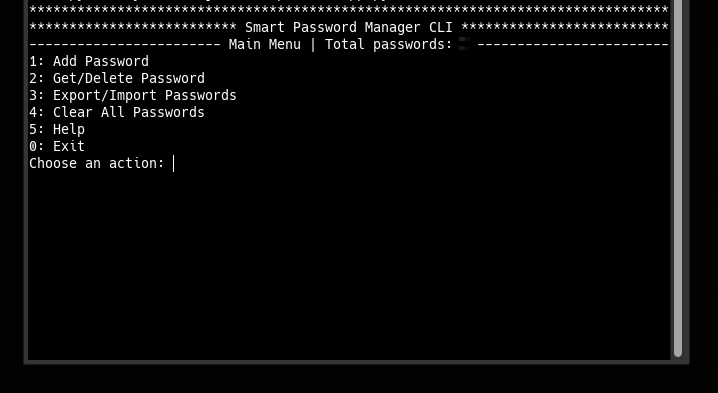
Main Menu Options:
- 1 — Add Password
- 2 — Get/Delete Password
- 3 — Export/Import Passwords
- 4 — Clear All Passwords
- 5 — Help
- 0 — Exit
Creating Your First Password:
- Launch
clipassman - Select option 1: Add Password
- Enter service description
- Enter your secret phrase (min 12 characters)
- Confirm your secret phrase
- Set password length (12-100, 16-24 recommended)
- Password is generated and displayed
Retrieving a Password:
- Select option 2: Get/Delete Password
- Choose password entry from numbered list
- Select 1: Get password
- Enter your secret phrase (hidden input)
- Password regenerates identically
-
Pointer-Based Security Paradigm
— 10.5281/zenodo.17204738
Architectural Shift from Data Protection to Data Non-Existence -
Local Data Regeneration Paradigm
— 10.5281/zenodo.17264327
Ontological Shift from Data Transmission to Synchronous State Discovery
clipassman produces identical passwords to:
Core Libraries:
- smartpasslib — Python
- smartpasslib-js — JavaScript
- smartpasslib-kotlin — Kotlin
- smartpasslib-go — Go
- smartpasslib-csharp — C#
CLI Applications:
Secret Phrase Security
- Permanent data loss — lost secret phrase = irreversible loss of all derived passwords
- No recovery mechanisms — no password recovery, no secret reset
- Deterministic generation — identical input = identical output
- Single point of failure — secret phrase is the sole authentication factor
Secret Phrase Strength:
- Minimum 12 characters is enforced
- Short secrets (under 12 chars) are automatically rejected
- Use a mix of: uppercase, lowercase, numbers, symbols
Remember: The app cannot recover your secret phrase. If you lose it, all passwords are permanently lost.
- Linux:
~/.config/smart_password_manager/passwords.json
By using this software, you agree to the full disclaimer terms.
Software provided "AS IS" without warranty. You assume all risks.
Full legal disclaimer: See DISCLAIMER.md
License: BSD 3-Clause License