
CLI Files Manager
Comprehensive, powerful command-line file management tool for Linux
File operations, MD5 checksums, hex viewing, recursive size analysis, device-wide search, and desktop integration — all from your terminal.
cli-files-manager — a comprehensive, powerful command-line file management tool with advanced features for Linux. Powerful file operations, MD5 checksums, hex viewing, recursive size analysis, device-wide search, and desktop integration — all from your terminal.
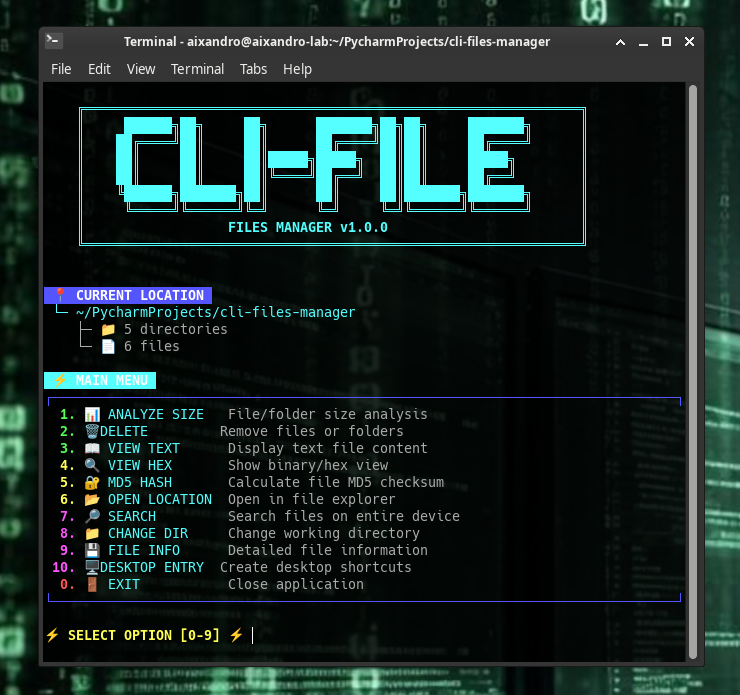
- 📊 Recursive size analysis — Scan folders and see detailed size breakdowns with progress bar
- 🗑️ Safe deletion — Delete files and folders with confirmation prompts
- 📖 Text file viewer — View any text file with paging support
- 🔍 Hex/Binary viewer — Examine raw file contents in hexadecimal format
- 🔐 MD5 hash calculator — Generate and verify file checksums
- 📂 Open location — Open current or selected path in system file explorer
- 🔎 Device-wide search — Find files by pattern with preview and navigation
- 📁 Interactive directory navigation — Change working directory with tab completion
- 💾 Detailed file info — View metadata, timestamps, sizes, and MD5
- 🖥️ Desktop integration — Create .desktop entries for app menu and desktop
- 🎨 Color-coded output — Beautiful terminal UI with intuitive color coding
- ⚡ Tab completion — Auto-complete file and directory paths
Dependencies:
# Arch Linux
sudo pacman -S python python-pip

# Debian/Ubuntu
sudo apt install python3 python3-pip

# Fedora/RHEL
sudo dnf install python3 python3-pip
No additional Python packages required — uses only standard library!
Setup:
git clone https://github.com/aixandrolab/cli-files-manager.git
cd cli-files-manager
python app.py
# Launch the interactive menu
python app.py

# Inside the application:

# 1. Analyze folder size
📊 ANALYZE SIZE → /home/user/Downloads

# 2. Search for files
🔎 SEARCH → pattern: *.txt

# 3. View file in hex
🔍 VIEW HEX → select any binary file

# 4. Calculate MD5
🔐 MD5 HASH → select any file

# 5. Create desktop shortcut
🖥️ DESKTOP ENTRY → create system integration
| Option | Command | Description |
|---|---|---|
| 1 | 📊 ANALYZE SIZE | Analyze file/folder size with progress bar |
| 2 | 🗑️ DELETE | Permanently delete files or folders |
| 3 | 📖 VIEW TEXT | Display text file content with pager |
| 4 | 🔍 VIEW HEX | Show binary/hexadecimal file view |
| 5 | 🔐 MD5 HASH | Calculate MD5 checksum of any file |
| 6 | 📂 OPEN LOCATION | Open path in system file explorer |
| 7 | 🔎 SEARCH | Search entire device for files by pattern |
| 8 | 📁 CHANGE DIR | Change working directory with TAB completion |
| 9 | 💾 FILE INFO | Show detailed file metadata |
| 10 | 🖥️ DESKTOP ENTRY | Install app to system menu/desktop |
| 0 | 🚪 EXIT | Exit application |
Analyze Folder Size:
📁 /home/user/Downloads
[████████████████████████████████████████] 1250/1250 files
📁 TOTAL SIZE: 2.45 GB
Search Files Device-Wide:
🔍 Enter search pattern: *.mp3
📁 Search root: /home/user/Music
# Results show all matches with sizes and paths
Calculate MD5 Hash:
MD5 Hash of file.iso:
a1b2c3d4e5f678901234567890123456
View Binary File in Hex:
00000000  89 50 4e 47 0d 0a 1a 0a  00 00 00 0d 49 48 44 52  .PNG........IHDR
00000010  00 00 02 00 00 00 02 00  08 06 00 00 00  ... etc
Create Desktop Integration:
✅ SUCCESS
✓ Application Menu: ~/.local/share/applications/cli-files-manager.desktop
✓ Desktop: ~/Desktop/cli-files-manager.desktop
cli-files-manager/
├── app.py                     # Main entry point
├── utils/
│   ├── asciiart.py            # ASCII logo and separators
│   ├── colors.py              # Terminal color definitions
│   ├── completer.py           # Tab completion handler
│   ├── desktop_entry.py       # .desktop file creator
│   └── file_manager.py        # Core file management logic
├── data/
│   ├── icons/
│   │   └── icon.png           # Application icon
│   └── images/
│       └── main_menu.png      # Menu screenshot (documentation)
├── LICENSE                    # BSD 3-Clause License
└── README.md                  # Documentation
- Pure Python 3 — Uses only standard library (no external dependencies)
- Tab completion — Powered by Python's
readlinemodule with custom path completer - Recursive scanning — Efficient directory walking with real-time progress
- Hex viewer — Binary-safe reading with hexdump-style formatting
- MD5 calculation — Streaming hash computation for files of any size
- Desktop integration — Generates freedesktop.org-compatible
.desktopfiles - Paging support — Uses
less/morefor long output, falls back to inline display
- Deletion is permanent — No recycle bin, files are removed immediately
- All operations require confirmation — Especially destructive actions
- No data collection — Works completely offline, no telemetry
- Respects permissions — Cannot access files without proper OS permissions
- Desktop files are safe — Created in user directories, not system-wide
- Tab completion not working?
pip3 install readline- "less" pager not found?
sudo apt install less(Debian/Ubuntu) orsudo pacman -S less(Arch)- Desktop entries not showing?
update-desktop-database ~/.local/share/applications/then log out and back in- Permission denied errors?
- Run with appropriate user permissions. Do NOT run as root unless necessary.
By using this software, you agree to the full disclaimer terms.
Software provided "AS IS" without warranty. You assume all risks for file operations, deletions, and system interactions.
Full legal disclaimer: See DISCLAIMER.md
License: BSD 3-Clause License
Links
Created by Aixandrolab
Copyright © 2026, Alexander Suvorov. All rights reserved.
If you find this useful, please star the repository!