
calculator
Beautiful and functional calculator built with PyQt6
Modern dark theme, keyboard shortcuts, and scientific notation support.
calculator — a beautiful and functional calculator built with PyQt6, featuring a modern dark theme, keyboard shortcuts, and scientific notation support.
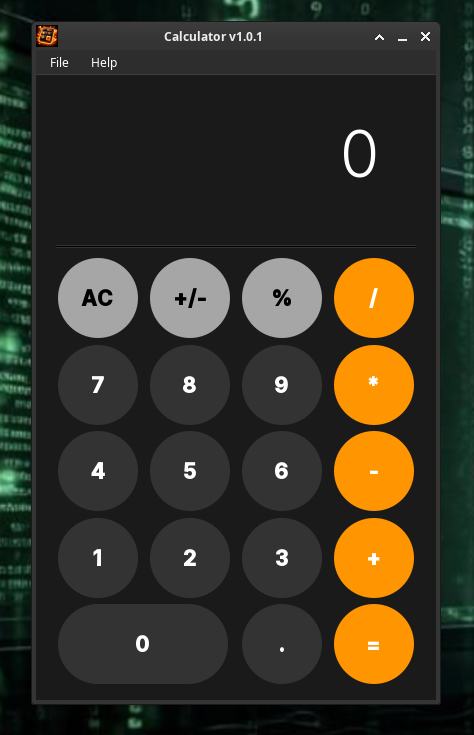
- Modern Dark Theme — Eye-friendly dark interface with orange accents
- Keyboard Support — Full keyboard control for faster calculations
- Scientific Notation — Automatically switches to scientific notation for large numbers
- Error Handling — Proper error handling for division by zero and invalid operations
- Responsive Design — Clean and intuitive button layout
- Desktop Integration — Create desktop shortcuts directly from the menu (Linux)
| Key | Action |
|---|---|
0-9 | Numbers |
. or , | Decimal point |
+ - * / | Operations |
Enter or = | Calculate result |
Esc or Delete | Clear all (AC) |
_ or ± | Change sign (+/-) |
% | Percentage |
Ctrl+Q | Exit application |
F1 | Open Help |
Ctrl+Alt+A | Show About |
Ctrl+/ | Show shortcuts help |
Prerequisites: Python 3.9+, pip
# Clone the repository
git clone https://github.com/aixandrolab/calculator.git
cd calculator

# Install dependencies
pip install -r requirements.txt

# Run the application
python app.py
Basic Calculations:
- Click the number buttons or use your keyboard to enter numbers
- Select an operation (+, -, *, /)
- Press
=orEnterto see the result
Special Functions:
AC— Clears everything and resets to zero+/-— Changes the sign of the current number%— Calculates the percentage of the current number
Decimal Numbers:
- Use the
.button or press.on your keyboard - The calculator prevents multiple decimal points
Error Recovery:
- If you see "Error" (usually from division by zero), press
ACto continue
The application allows you to create desktop entries directly from the menu:
- Go to File → Create Desktop Entry
- Choose locations:
- ✓ Application Menu (
~/.local/share/applications/) - □ Desktop (
~/Desktop/)
- ✓ Application Menu (
- Click "Create Entry"
What happens:
- Creates
.desktopfile(s) with proper configuration - Sets executable permissions automatically
- Uses application icon if available
Note: This feature is only available on Linux systems with desktop environments that support .desktop files (GNOME, KDE, XFCE, etc.).
calculator/
├── app.py                 # Main application entry point
├── core/
│   ├── __init__.py
│   ├── main_window.py    # Main calculator window
│   └── dialogs/
│       ├── __init__.py
│       ├── about_dialog.py
│       ├── help_dialog.py
│       └── shortcuts_dialog.py
├── data/
│   ├── icons/
│   │   └── icon.png       # Application icon
│   └── images/
│       └── logo.png       # Screenshot for README
├── LICENSE
├── requirements.txt
└── README.md
By using this software, you agree to the full disclaimer terms.
Software provided "AS IS" without warranty. You assume all risks.
Full legal disclaimer: See DISCLAIMER.md
License: BSD 3-Clause License