
Android Todo App
Simple yet powerful task management application for Android
Full CRUD operations, priority system, deadline reminders, and persistent local storage. Built with Kotlin.
android-todo-app — a simple yet powerful task management application with full CRUD operations, priority system, deadline reminders, and persistent local storage. Designed for productivity: create, track, and complete tasks with intuitive gestures, smart notifications, and beautiful dark theme interface.
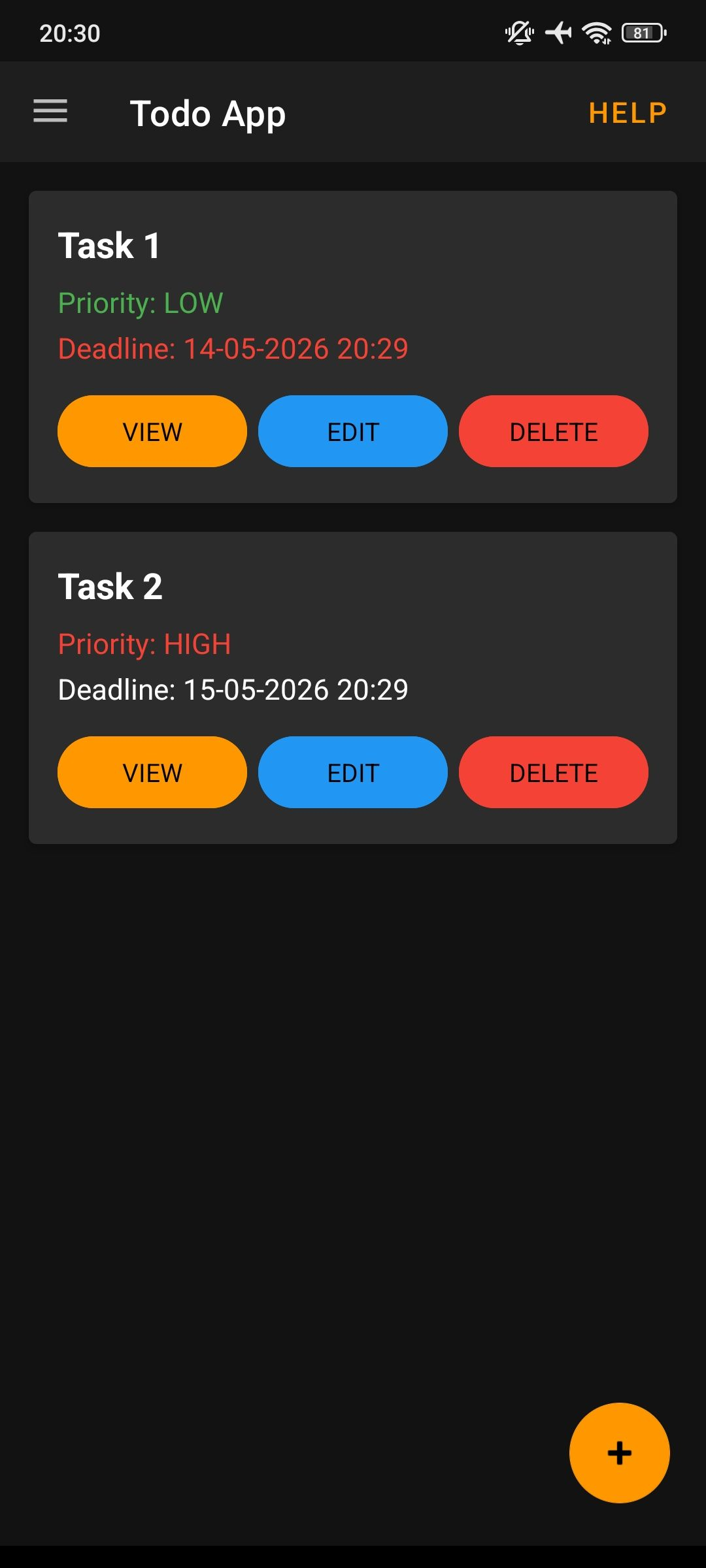
Main Screen
- Full CRUD Operations — Create, Read, Update, and Delete tasks with ease
- Priority Levels — Low (green), Medium (yellow), High (red)
- Deadline Management — Set exact date and time for each task
- Smart Notifications — Automatic reminders for overdue, urgent, and upcoming tasks
- Swipe Gestures — Left to complete/uncomplete, right to delete
- Drag & Drop — Reorder tasks by long pressing and dragging
- Persistent Storage — Data saved in Documents folder (survives app updates)
- Dark Theme — Beautiful dark interface with orange accents
- Interactive Help Mode — Tooltips explaining every button
- Startup Summary — Dialog showing overdue/today/tomorrow tasks
Prerequisites: Android 7.0 (API level 24) or higher
Installation:
- Download the APK from the Releases page
- Enable "Unknown Sources" in your Android settings (if needed)
- Install the APK and open the app
First Launch:
- Grant Storage Permission — Required for saving tasks in Documents folder
- Grant Notification Permission (Android 13+) — Required for deadline reminders
- Start adding your tasks!
Creating a Task:
- Tap the + button (floating action button in bottom-right corner)
- Enter Title (required)
- Enter Description (optional)
- Select Priority (Low/Medium/High)
- Set Deadline (date and time picker)
- Tap Save
Viewing Task Details:
Tap the VIEW button on any task card to see full description, priority, deadline, status, and creation date.
Editing a Task:
- Tap the EDIT button on any task card
- Modify title, description, priority, or deadline
- Tap Save
Deleting a Task:
- Method 1: Tap the DELETE button on the task card
- Method 2: Swipe RIGHT on the task card
- Confirmation dialog prevents accidental deletion
Completing Tasks:
- Swipe LEFT on any task to mark as completed
- Swipe LEFT again on completed task to mark as not completed
- Completed tasks have a green border and "✓ COMPLETED" badge in the corner
Reordering Tasks:
- Long press on any task card
- Drag up or down to move the task
- Release — order is saved automatically
| Indicator | Meaning |
|---|---|
| 🔴 Red deadline text | Task is OVERDUE |
| 🟠 Orange deadline text | Task is due TODAY |
| 🟡 Yellow deadline text | Task is due TOMORROW |
| 🟢 Green border | Task is COMPLETED |
| Dimmed appearance | Task is completed |
| ✓ COMPLETED badge | Task is completed (top-right corner) |
Priority Colors:
| Priority | Color |
|---|---|
| LOW | Green |
| MEDIUM | Yellow |
| HIGH | Red |
The app checks for deadlines every hour and sends notifications based on urgency:
| Type | Condition | Priority |
|---|---|---|
| ⚠️ OVERDUE | Past deadline | High + Vibe |
| 🔔 URGENT | Due in less than 12 hours | High + Vibe |
| 📅 REMINDER | Due in less than 24 hours | Normal |
On startup: A dialog shows all tasks that are overdue, due today, or due tomorrow.
Custom Notification Sound: Place notify.wav in app/src/main/res/raw/ for custom sound.
Tap the Help button (top-right corner) to enable interactive help mode:
- Tooltips appear explaining every button
- Swipe gesture tooltips appear
- Drag & drop tooltips appear
- Tap Help again to disable
Tooltips shown:
- ➕ ADD NEW TASK — + button
- ❓ DISABLE HELP MODE — Help button
- 👉 Swipe gestures
- ↕️ Drag to reorder
Storage Locations:
| Type | Path |
|---|---|
| Tasks file | Documents/android-todo-app/todos.json |
| Order file | Documents/android-todo-app/order.json |
Note: Your data persists even after app updates or reinstallation.
Permissions:
| Permission | Required For |
|---|---|
POST_NOTIFICATIONS (Android 13+) | Deadline reminders |
WRITE_EXTERNAL_STORAGE (Android 10-) | Saving tasks to Documents folder |
READ_EXTERNAL_STORAGE (Android 10-) | Reading saved tasks |
Storage permission is required for the app to work properly. Notification permission is optional but recommended for reminders.
| Component | Technology |
|---|---|
| Language | Kotlin |
| UI | Material Design + XML |
| Architecture | MVVM (ViewModel + LiveData) |
| Background | WorkManager (periodic checks) |
| Storage | Local JSON files (Gson) |
| Minimum SDK | 24 (Android 7.0 Nougat) |
| Target SDK | 36 (Android 15) |
Build Requirements:
- Android Studio Hedgehog | 2023.1.1 or higher
- JDK 11 or higher
- Android SDK with API 36
Build from Source:
git clone https://github.com/aixandrolab/android-todo-app.git
# Open in Android Studio
# Wait for Gradle sync to complete
./gradlew assembleDebug
By using this software, you agree to the full disclaimer terms.
Software provided "AS IS" without warranty. You assume all risks. The author is not responsible for any data loss or damages arising from using this application.
Full legal disclaimer: See DISCLAIMER.md
License: BSD 3-Clause License