Smart Repository Manager GUI v1.2.9
Powerful desktop application for managing GitHub repositories
Intelligent synchronization, multi-user support, and comprehensive visual management tools.
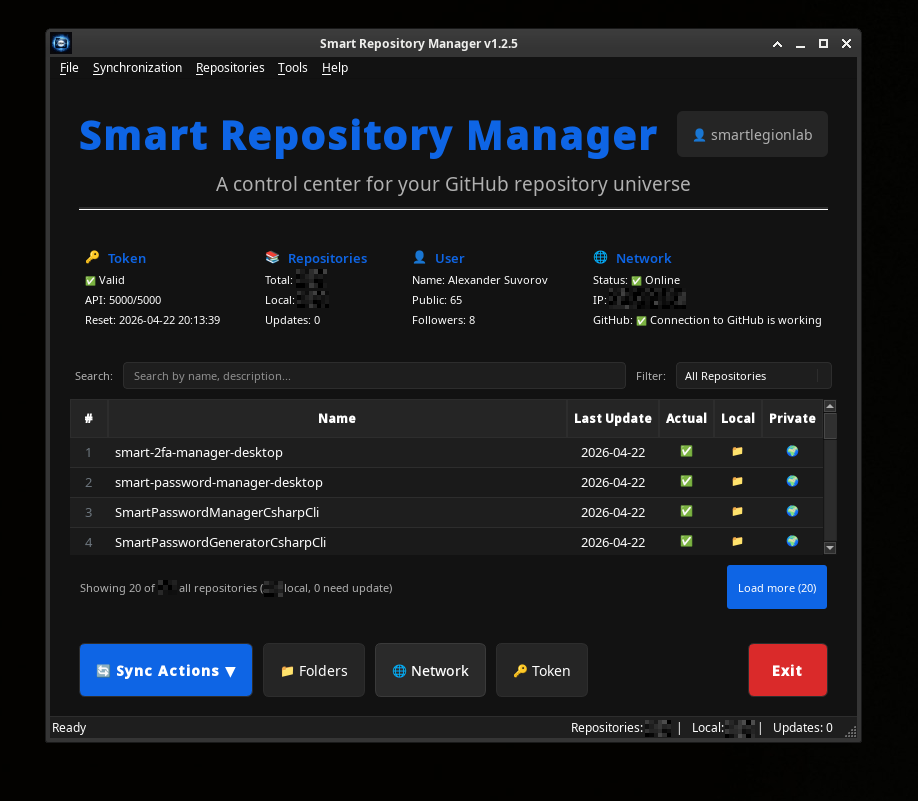
Smart Repository Manager GUI provides a complete visual interface for managing your GitHub repositories.
- Visual Management — full graphical interface for all operations
- Smart Table — lazy-loading repository list with filtering and search
- Multi-User Support — switching between GitHub accounts
- Keyboard-Driven — complete keyboard shortcuts for power users
Every session begins with an 8-step mandatory system checkup:
- Directory Structure — creates and verifies workspace organization
- Internet Connection — validates network connectivity
- User Management — select or add GitHub account
- User Data — fetches GitHub profile information
- Repository Loading — retrieves complete repository list
- Local Copy Check — scans for existing local repositories
- Update Detection — identifies repositories needing updates
- Synchronize All (Ctrl+S) — Complete bidirectional sync
- Update Needed Only (Ctrl+U) — Smart update detection
- Clone Missing Only (Ctrl+M) — Selective cloning
- Sync with Repair (Ctrl+R) — Advanced recovery
- Re-clone All — Complete refresh
- Download All As Zip — Complete parallel download
Live Console: Every sync operation displays real-time logs with timestamp, status, and duration.
Repository Table
- Lazy Loading — loads 20 repositories at a time
- Smart Filtering — Local/Remote, Needs Update, Private/Public, Forks, Archived
- Instant Search — real-time filtering by name, description, or language
- Visual Indicators — status icons for local presence and update requirements
- Context Menu — right-click actions for quick operations
Status Panels
- Token: Token validity, API limits, reset time
- Repositories: Total count, local copies, pending updates
- User: Display name, public repos, followers count
- Network: Connection status, external IP, GitHub accessibility
File
Ctrl+B — Create Archive
F5 — Refresh
Ctrl+Q — Exit
Synchronization
Ctrl+S — Synchronize All
Ctrl+U — Update Needed Only
Ctrl+M — Clone Missing Only
Ctrl+Shift+R — Sync with Repair
Ctrl+Alt+R — Re-clone All
Repositories
Ctrl+Shift+B — Open in Browser
Ctrl+L — Open Local Folder
Ctrl+D — Show Details
Ctrl+Del — Delete Local Copy
Tools
Ctrl+I — User Information
Ctrl+T — Token Information
Ctrl+Shift+N — Network Information
- Add Users — quick token validation and GitHub profile fetch
- Switch Users — instant context switching with visual feedback
- Delete Users — complete removal of user data and tokens
- Avatar Support — automatic avatar download and circular display
- Persistent Storage — token storage per user
- Language: Python 3.8+
- GUI: PyQt6
- Core Library: smart-repository-manager-core
- Platform: Linux (cross-platform ready)
- API: GitHub API v3/v4
- License: BSD 3-Clause
This GUI application is powered by the same core engine as:
- Smart Repository Manager Core — Python library for managing Git repositories
- Smart Repository Manager CLI — command-line tool with identical functionality
Directory Structure
~/smart_repository_manager/
├── config.json              # Multi-user configuration
├── username_1/             # User-specific directories
│   ├── repositories/       # Local Git repositories
│   ├── archives/          # ZIP backups
│   ├── downloads/          # Downloaded ZIP archives
│   ├── logs/             # Operation logs
│   ├── backups/          # Manual backups
│   ├── temp/             # Temporary files
│   └── avatar.png        # GitHub profile picture
└── username_2/            # Additional users