Smart Project Manager v1.0.8
Desktop application for comprehensive project and task management
Hierarchical structure, visual labels, automatic progress tracking, and dark-themed interface.
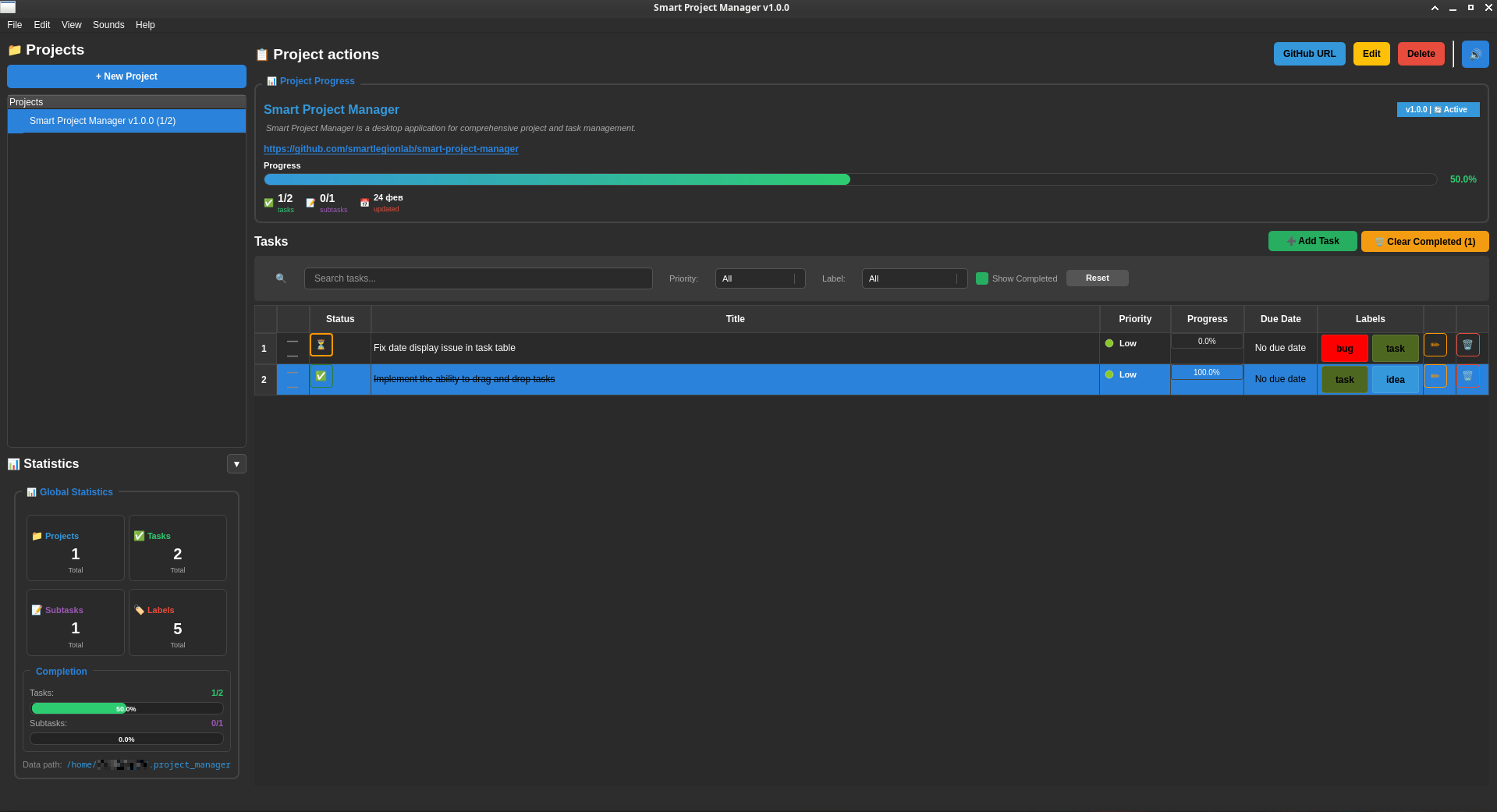
Smart Project Manager is a desktop application for comprehensive project and task management, built with Python and PyQt5. It provides a hierarchical system for organizing projects, tasks, and subtasks, featuring visual labels, automatic progress tracking, and a dark-themed user interface.
Author: Alexander Suvorov
GitHub: smartlegionlab
- Create, edit, and delete projects with name, version, and description
- Hierarchical structure: Projects → Tasks → Subtasks
- Automatic progress calculation based on task completion
- Create tasks and subtasks with titles, descriptions, priorities (High/Medium/Low), and optional due dates
- Automatic completion logic — a task is complete when all its subtasks are completed
- Toggle completion status directly from the main interface
- Create custom labels with name, color, and description
- Assign labels to tasks and subtasks for categorization
- Dedicated Label Manager for creating, editing, and deleting labels
- Visual progress bars for tasks, subtasks, and overall projects
- Real-time global statistics dashboard with counts and completion rates
- Detailed project progress panel with task/subtask counts and last update time
- Dark theme optimized for extended use
- Two-panel layout: Project tree on the left, task table and details on the right
- Context menus for quick task actions (view, edit, mark complete, delete)
- Interactive tables with buttons for editing, deleting, and toggling status
- Automatic saving to
~/.smart_project_manager/projects.json - JSON-based storage for projects, tasks, subtasks, and labels
- Data automatically loaded on application startup
Ctrl+N — New Project
Ctrl+T — New Task
Ctrl+B — Create BackUp
Ctrl+I — Import
Ctrl+Shift+E — Export
Ctrl+E — Edit Selected Project
Ctrl+D — Delete Selected Project
Ctrl+L — Manage Labels
F5 — Refresh View
F1 — Open Help
Ctrl+Q — Exit Application
The application allows you to create desktop entries directly from the menu:
- Go to File → Create Desktop Entry
- Choose locations: Application Menu or Desktop
- Creates
.desktopfile with proper configuration
Available on Linux systems with desktop environments that support .desktop files (GNOME, KDE, XFCE).
- Language: Python 3.7+
- GUI: PyQt5
- Storage: JSON (local file)
- Platform: Linux (cross-platform ready)
- License: BSD 3-Clause
Planned Features:
- Task Filtering System — filter completed vs. pending tasks, by priority, due date, labels
- Persist filter settings between sessions