Smart Password Manager v4.0.0
Desktop manager for deterministic smart passwords (C#)
Generate, manage, and retrieve passwords without storing them. Your secret phrase never leaves your device.
Decentralized by Design: Unlike traditional password managers that store encrypted vaults on central servers, Smart Password Manager stores nothing. Your secrets never leave your device. Passwords are regenerated on-demand — no cloud, no database, no trust required.
- Zero-Storage Security — no passwords or secret phrases are ever stored or transmitted
- Decentralized Architecture — no central servers, no cloud dependency
- Deterministic Regeneration — passwords are recreated identically from your secret phrase
- Metadata Only — store only descriptions and verification keys
- Client-Side Generation — all cryptographic operations happen on your device
- On-Demand Discovery — passwords exist only when you generate them
- Decentralized & Serverless — no central database, no cloud lock-in
- Smart Password Generation — deterministic from secret phrase
- Dynamic Key Derivation — 15-30 iterations for private key, 45-60 for public key
- Secret Verification — verify secret without exposing it
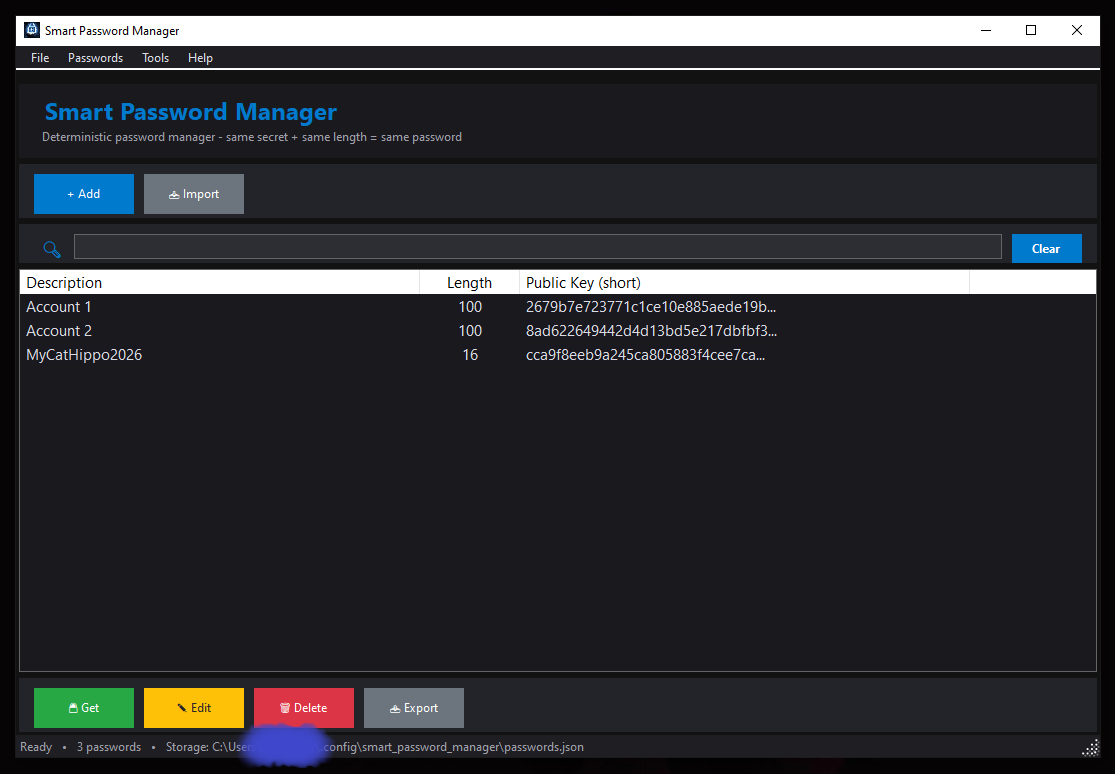
- Dark Theme Interface — easy on the eyes
- Full CRUD Operations — Create, Read, Update, Delete
- Search & Filter — quickly find your passwords
- Export/Import — backup and restore your password metadata
- QR Code Export — transfer metadata to Android app
- Keyboard Shortcuts — full keyboard navigation
- Context Menus — right-click for quick actions
- Proof of Knowledge — public keys verify secrets without exposing them
- Decentralized Trust — no third party needed
- Deterministic Security — same secret + length = same password
- Metadata Separation — non-sensitive data stored in JSON file
- Local Processing — secret and password never leave your device
- No Recovery Backdoors — lost secret = permanently lost access
Validation Rules: Secret phrase: minimum 12 characters · Password length: 12-100 characters
Ctrl+N — Add new password
Ctrl+E — Edit selected
Ctrl+R — Show QR code
Ctrl+G — Get password
Ctrl+I — Import passwords
Ctrl+X — Export passwords
Ctrl+F — Focus search box
Ctrl+/ — Show shortcuts
Ctrl+D — Show disclaimer
Ctrl+L — Show license
Ctrl+A — Show about
Ctrl+Q — Exit application
Delete — Delete selected
F1 — Show help
-
Pointer‑Based Security Paradigm
— 10.5281/zenodo.17204738
Architectural Shift from Data Protection to Data Non-Existence -
Local Data Regeneration Paradigm
— 10.5281/zenodo.17264327
Ontological Shift from Data Transmission to Synchronous State Discovery
Powered by smartpasslib-csharp
Key Derivation (same as Python/JS/Kotlin/Go v4.0.0):
| Key Type | Iterations | Purpose |
|---|---|---|
| Private Key | 15-30 (dynamic) | Password generation (never stored, never transmitted) |
| Public Key | 45-60 (dynamic) | Verification (stored locally) |
Character Set (Google-compatible):
!@#$%^&*()_+-=[]{};:,.<>?/ABCDEFGHIJKLMNOPQRSTUVWXYZ0123456789abcdefghijklmnopqrstuvwxyz
- Language: C#
- Framework: .NET (WinForms)
- Core Library: smartpasslib-csharp
- Platform: Windows
- Security: SHA-256, CSPRNG, Zero-Storage
- License: BSD 3-Clause
Core Libraries:
- smartpasslib — Python
- smartpasslib-js — JavaScript
- smartpasslib-kotlin — Kotlin
- smartpasslib-go — Go
- smartpasslib-csharp — C#
Other Apps:
Storage Locations
- Windows:
%USERPROFILE%\.config\smart_password_manager\passwords.json - Export files:
%USERPROFILE%\SmartPasswordManager\passwords_export_[date].json