github-ssh-key v1.0.0
GitHub SSH key manager
Console utility for creating, getting, testing, and using public SSH keys for GitHub.
Python
CLI
SSH
GitHub
PyPI
Linux
Termux
github-ssh-key — GitHub SSH key manager. Console utility for creating, getting, testing, and using public SSH keys for GitHub.
Supported:
- Linux — All
- Termux (Android)
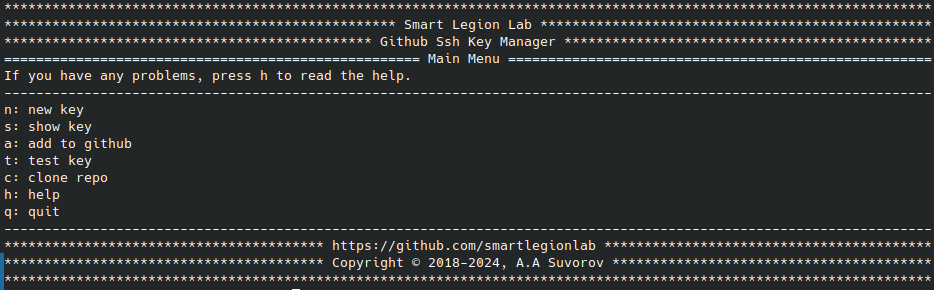
- Convenient interactive menu
- Generating SSH keys for GitHub
- Output SSH key to the console
- Adding SSH key to GitHub
- Checking the SSH key, testing the connection
- Interactive menu for working with the utility
- Interactive menu for help
- Launch the default browser with a page for adding SSH key on GitHub
- Cloning private repositories via SSH
- Running individual commands
| Command | Description |
|---|---|
github-ssh-key | Run interactive menu |
github-ssh-key new -e [email] | Generate new SSH key |
github-ssh-key show | Show SSH key to console |
github-ssh-key add | Add SSH key to GitHub |
github-ssh-key test | Test SSH connection |
github-ssh-key clone -l [login] -n [repo] | Clone private repository via SSH |
github-ssh-key help | Show help |
Use github-ssh-key [command] -h for detailed help on each command.
From PyPI:
pip install github-ssh-key
github-ssh-key
From Source:
# Variant 1 (setup.py)
python setup.py install
github-ssh-key

# Variant 2 (direct)
pip install -r requirements.txt
python github-ssh-key.py
To access GitHub over SSH, follow these steps:
- Install
opensshor ensuresshcommand is available - Generate new SSH key using the utility
- Copy the public key
- Add your public key to GitHub
- Test the connection
The utility provides all these capabilities in an interactive menu:
github-ssh-key
- Language: Python
- Platform: Linux, Termux (Android)
- License: BSD 3-Clause