Forgejo Sync Manager v1.0.2
Desktop GUI application for batch synchronization of Forgejo repositories to local machine
Dark theme, real-time progress, multi-repository operations.
Python
PyQt6
Forgejo
Desktop
Linux
Git
Desktop GUI application for batch synchronization of Forgejo repositories to local machine.
- Modern dark theme GUI interface
- Automatic authentication via personal access token
- Batch repository cloning and updating with real-time progress tracking
- Visual repository list with search and filter capabilities
- Full repository recloning option
- Local repository deletion
- One-click open in browser or local folder
- Persistent configuration storage
- Multi-repository selection for batch operations
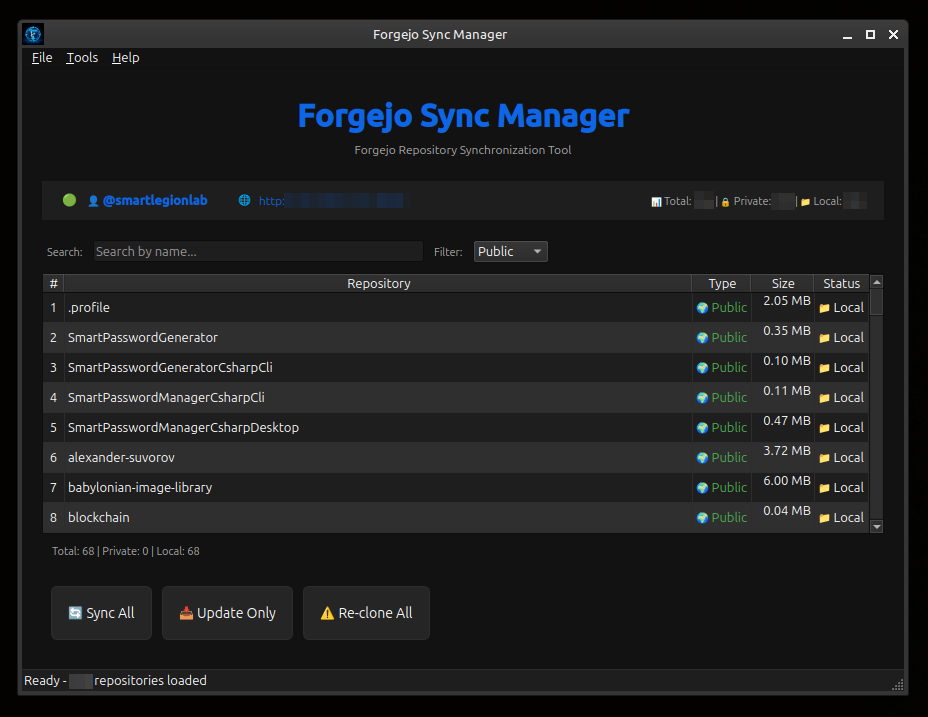
Main Window Components
- Top Panel — Application title and description
- Info Panel — Connection status, user info (clickable), server URL (clickable), repository statistics
- Repository Table — List of all repositories with columns: #, Repository, Type (Public/Private), Size, Status (Local/Remote)
- Search & Filter — Search by name, filter by Public/Private/Forks/Local/Remote
Action Buttons
- Sync All — Clone missing repositories and update all local copies
- Update Only — Update only already cloned repositories
- Re-clone All — Delete all local copies and clone again from server
Right-click on repository:
- Sync — Clone if missing, update if exists
- Re-clone — Delete local copy and clone again
- Delete Local — Remove local repository folder (for local repositories only)
- Open Local Folder — Open repository folder in file manager
- Open in Browser — Open repository on Forgejo web interface
- Ctrl+Shift+S — Sync All Repositories
- Ctrl+Shift+U — Update Only Existing Repositories
- Ctrl+Shift+R — Re-clone All Repositories
- Ctrl+Q — Exit Application
- Ctrl+, — Open Settings
- Ctrl+/ — Show Keyboard Shortcuts
- Ctrl+Shift+A — Show About Dialog
When starting any sync operation, a dialog appears showing:
- Real-time progress bar
- Current repository being processed
- Operation log with timestamps
- Summary statistics upon completion
- Authentication: Token-based authentication via Forgejo API
- Repository Discovery: Fetches complete repository list with pagination (50 per page)
- Sync Operations: Uses authenticated URLs with embedded token for Git operations
- Real-time UI Updates: Repository status changes immediately after each successful operation
- Language: Python 3.8+
- GUI: PyQt6
- Core Library: forgejo-sync-manager-core
- HTTP: requests
- Platform: Linux (cross-platform ready)
- License: BSD 3-Clause
- forgejo-sync-manager-core — Universal core library for Forgejo repository synchronization
- PyQt6 — Python bindings for Qt6 framework
- requests — HTTP library for Python
- forgejo-sync-manager-cli — Command-line interface for batch synchronization
- forgejo-sync-manager-core — Universal core library