CLIPassMan v4.0.0
Console Smart Password Manager
Terminal-based smart password manager with deterministic password generation. Generate, manage, and retrieve passwords without storing them — all from your command line.
Decentralized by Design: Unlike traditional password managers that store encrypted vaults on central servers, Smart Password Manager stores nothing. Your secrets never leave your device. Passwords are regenerated on-demand — no cloud, no database, no trust required.
- Zero-Storage Security — no passwords or secret phrases are ever stored or transmitted
- Decentralized Architecture — no central servers, no cloud dependency
- Deterministic Regeneration — passwords are recreated identically from your secret phrase
- Metadata Only — store only descriptions and verification keys
- Terminal Processing — all cryptographic operations happen in your CLI
- On-Demand Discovery — passwords exist only when you generate them
- Decentralized & Serverless — no central database, no cloud lock-in
- No Password Database — eliminates password storage completely
- Interactive Terminal UI — clean, centered text with visual framing
- Public Key Verification — verify secret knowledge without exposure
- List View — see all your password metadata in clear lists
- Export/Import — backup and restore functionality with timestamped files
- Bulk Operations — clear all passwords with double confirmation
- Secure Hidden Input — hidden secret phrase entry via getpass
- Server Ready — perfect for headless systems and remote management
- Proof of Knowledge — public keys verify secrets without exposing them
- Decentralized Trust — no third party needed
- Deterministic Security — same secret + length = same password, always
- Metadata Separation — non-sensitive data stored separately from verification
- Local Processing — no data leaves your computer
- No Recovery Backdoors — lost secret = permanently lost access
Launch
clipassman
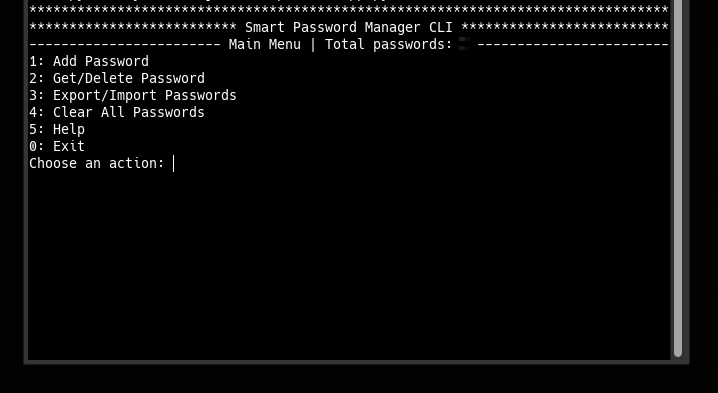
Main Menu Options:
- 1 — Add Password
- 2 — Get/Delete Password
- 3 — Export/Import Passwords
- 4 — Clear All Passwords
- 5 — Help
- 0 — Exit
-
Pointer‑Based Security Paradigm
— 10.5281/zenodo.17204738
Architectural Shift from Data Protection to Data Non-Existence -
Local Data Regeneration Paradigm
— 10.5281/zenodo.17264327
Ontological Shift from Data Transmission to Synchronous State Discovery
Powered by smartpasslib v4.0.0+
Key Derivation (same as JS/Kotlin/Go/C# v4.0.0):
| Key Type | Iterations | Purpose |
|---|---|---|
| Private Key | 15-30 (dynamic) | Password generation (never stored, never transmitted) |
| Public Key | 45-60 (dynamic) | Verification (stored locally) |
Character Set (Google-compatible):
!@#$%^&*()_+-=[]{};:,.<>?/ABCDEFGHIJKLMNOPQRSTUVWXYZ0123456789abcdefghijklmnopqrstuvwxyz
Validation Rules: Secret phrase: min 12 chars · Password length: 12-100 chars
- Language: Python 3.7+
- Core Library: smartpasslib
- Platform: Linux / macOS / Windows
- License: BSD 3-Clause
Core Libraries:
- smartpasslib — Python
- smartpasslib-js — JavaScript
- smartpasslib-kotlin — Kotlin
- smartpasslib-go — Go
- smartpasslib-csharp — C#
CLI Applications:
Storage Locations
- Linux:
~/.config/smart_password_manager/passwords.json